


Description
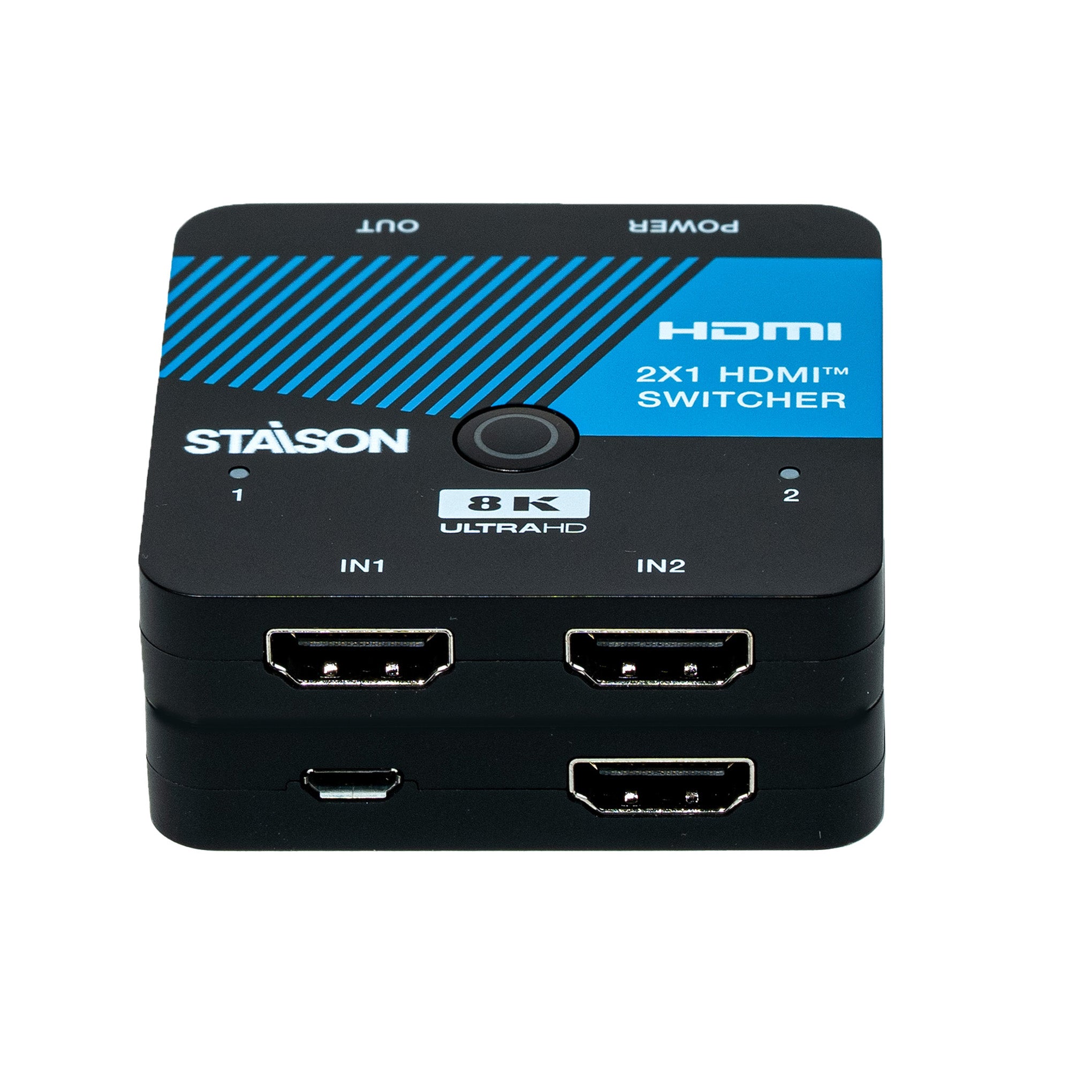
ST-NSWC21 HDMI Switcher is a professional 8K 2x1 HDMI 2.1 switch designed for conference rooms, digital signage, home theater, security monitoring, and commercial AV applications. The ST-NSWC21 HDMI Switcher supports 48Gbps bandwidth, HDMI 2.1, HDCP 2.3, HDR10+, Dolby Vision, auto EDID management, and automatic input switching for reliable 8K video distribution. The ST-NSWC21 HDMI Switcher delivers stable performance with support for 8K@60Hz, 4K@120Hz, HDR, and immersive HDMI audio formats.
The ST-NSWC21 HDMI Switcher includes advanced HDMI 2.1 features for reliable 8K signal switching.
Features
☆ HDMI 2.1 and HDCP 2.3 compliant
☆ Support 48Gbps video bandwidth
☆ 8K@60Hz 4:2:0 12-bit, 8K@30Hz 4:4:4 10-bit, 4K@120Hz 4:4:4 10-bit video support
☆ Support HDR, HDR10, HDR10+, Dolby Vision, HLG pass through
☆ VRR, FVA, ALLM support
☆ Support HDMI audio formats: LPCM 7.1CH, Dolby TrueHD, and DTS-HD Master Audio
☆ 2x1 switch output, auto switch supported
☆ Built-in Equalizer and Driver
☆ Auto EDID management
☆ Compact design for easy and flexible installation
Package Contents
① 1x 8K Two-Input HDMI Switcher
② 1x Micro USB Power Cable
③ 1x User Manual
Specifications
| Technical | |
| HDMI Compliance | HDMI 2.1 |
| HDCP Compliance | HDCP 2.3 |
| Video Bandwidth | 48Gbps |
| Video Resolution | Up to 8K@60Hz 4:2:0 12-bit, 8K@30Hz 4:4:4 10-bit, 4K@120Hz 4:4:4 10-bit |
| Color Depth | 8-bit, 10-bit, 12-bit |
| Color Space | RGB, YCbCr 4:4:4 / 4:2:2 / 4:2:0 |
| HDMI Audio Formats | LPCM, Dolby Digital/Plus/EX, Dolby True HD, DTS, DTS-EX, DTS-96/24, DTS High Res, DTS-HD Master Audio, DSD |
| Connection | |
| Input | 2x HDMI IN [Type A, 19-pin female] 1x POWER [Micro USB, power port] |
| Output | 1x HDMI OUT [Type A, 19-pin female] |
| Mechanical | |
| Housing | Plastic Enclosure |
| Color | Black |
| Dimensions | 60mm [W] × 60mm [D] × 12mm [H] |
| Weight | 31g |
| Power Supply | USB 5V |
| Power Consumption (Max) | 1.25W (Max) |
| Operating Temperature | 0°C ~ 40°C / 32°F ~ 104°F |
| Storage Temperature | -20°C ~ 60°C / -4°F ~ 140°F |
| Operating Humidity | 20%~90% RH (non-condensing) |
Operation Controls and Functions

| No. | Name | Function Description |
|---|---|---|
| 1 | Switch Button / Power LED | Short pressing the switch button will allow the device to switch any of the two HDMI input signals to the HDMI display. Long press this button to enter the auto switching mode. When the device is powered on, the green power LED is on. |
| 2 | Input LED (1~2) | When the HDMI IN1/2 port is selected as the input source channel, the corresponding green LED is on. |
| 3 | HDMI IN1/2 Port | HDMI signal input ports, connected to HDMI source devices such as DVD or PS5 with an HDMI cable. |
| 4 | POWER Port | DC 5V USB power input port. |
| 5 | HDMI OUT Port | HDMI signal output port, connected to HDMI display device such as TV or Monitor with an HDMI cable. |
Notes
1. While using the HDMI switcher, power supply via Micro USB cable is not necessary. But in case some of your HDMI devices have insufficient power, please connect a Micro USB cable to your USB devices for power supply.
2. If you need to use the switcher to output signals of 4K@120Hz or 8K@60Hz, please make sure that your HDMI cable, HDMI signal source and HDMI display all support the above resolution.
3. The length of the HDMI cables connected to both ends of the switcher should not be too long, otherwise it will easily cause the screen to flicker. The following HDMI cables are suggested:
8K60, 8K30, 4K120: Ultra HDMI 2.1 cable, IN/OUT 2 meters.
4K60 4:4:4: HDMI 2.0 cable, IN/OUT 3 meters.
4K60 4:2:0, 4K30, 1080P: HDMI cable, IN/OUT 5 meters.
Application Example
