
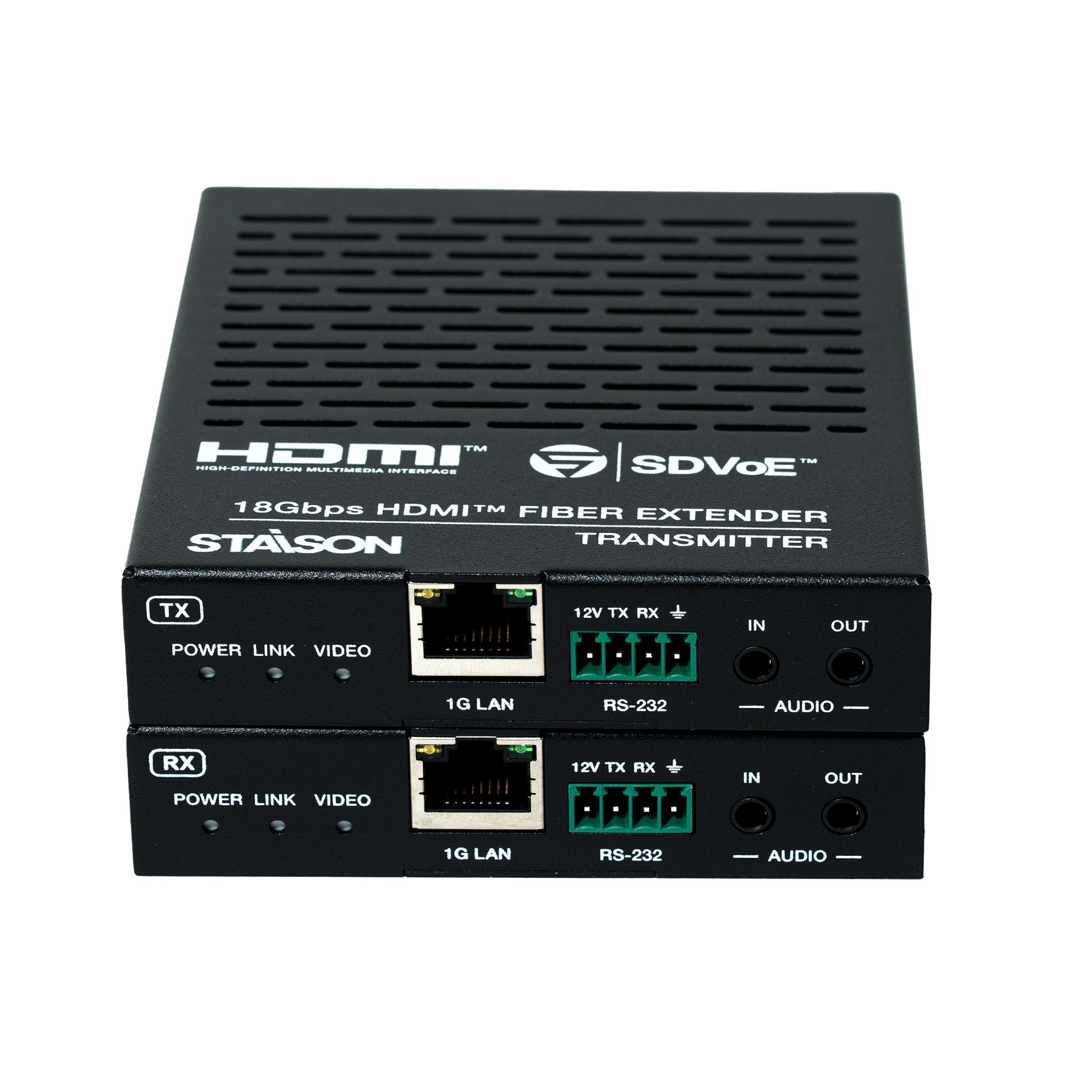


Description
The 4K60 HDMI™ over fiber extender is based on SDVoE technology for distributing one UHD content to one UHD display device. It features a 10G fiber port that can extend signals up to 10km via single-mode fiber cable, or 300m via multi-mode fiber cable. It provides highest-quality, uncompressed 4K60 and zero-frame latency audio/video extension.
The 1G LAN port serves as a utility port for product management or Ethernet extension. The Transmitter (TX) supports HDMI™ loop out. The extender supports bi-directional analog stereo audio pass-through and RS-232 with 12V voltage output on connector.
Features
☆ 4K60 HDMI™ over fiber extender based on SDVoE technology
☆ Video resolution up to 4K2K@60Hz 4:4:4 (HDMI™ 2.0b)
☆ HDCP 2.2 compliant — 18Gbps video bandwidth
☆ Uncompressed 4K60 and zero-frame latency audio/video
☆ Compatible with HDR, Dolby Vision, HLG video formats
☆ Transmitter (TX) supports HDMI™ loop out
☆ RS-232 and CEC pass-through
☆ Configurable RS-232 baudrate settings via Upper Computer software
☆ LPCM 2/5.1/7.1, Dolby Digital, Dolby Digital+, Dolby TrueHD, Dolby Atmos, DTS 5.1, DTS-HD Master Audio, DTS:X
☆ Bi-directional analog stereo audio pass-through
☆ 1G Ethernet extension via 1G LAN port
☆ 2× 10G SFP+ 10km fiber modules included (TX + RX pair)
Package Contents
① 1× 4K60 HDMI™ 10G Fiber Extender — Transmitter (TX)
② 1× 4K60 HDMI™ 10G Fiber Extender — Receiver (RX)
③ 4× Mounting Ears
④ 8× Machine Screws (KM3×4)
⑤ 2× 12V/1A Locking Power Supplies
⑥ 2× 4-pin 3.5mm Phoenix Connectors (Male)
⑦ 2× Optical Fiber Modules (SFP-BL32TG-10DC for TX + SFP-BL23TG-10DC for RX)
⑧ 1× User Manual
Specifications
| Technical | |
| HDMI™ Compliance | HDMI™ 2.0b |
| HDCP Compliance | HDCP 2.2 |
| Video Bandwidth | 594MHz / 18Gbps |
| Video Compression | SDVoE (Uncompressed) |
| Color Space | RGB, YCbCr 4:4:4 / 4:2:2, YUV 4:2:0 |
| Color Depth | 8/10/12-bit |
| HDR | HDR, Dolby Vision, HLG |
| ESD Protection | IEC 61000-4-2: ±15kV (Air-gap discharge), ±8kV (Contact discharge) |
| Video | |
| Input Video Resolution | 640×480p60 up to 4096×2160p60Hz (480i/p, 576i/p, 720p, 1080i/p, 2160p at various frame rates) |
| Output Video Resolution | Pass-through |
| Video Latency | Zero latency |
| Audio | |
| Audio Formats | LPCM 2/5.1/7.1, Dolby Digital, Dolby Digital+, Dolby TrueHD, Dolby Atmos, DTS 5.1, DTS-HD Master Audio, DTS:X |
| Audio Latency | Zero latency |
| Audio Sample Rate | 22.05 / 24 / 32 / 44.1 / 48 / 88.2 / 96 / 176.4 / 192kHz |
| L/R IN/OUT Level | 1Vrms @ unbalanced audio |
| Input Impedance | 10K Ohms |
| Output Impedance | 330 Ohms |
| Frequency Response | +0.5dB / -0.5dB, 20Hz to 20kHz |
| Audio S/N Ratio | Line out: 88dB@0dBFS, 1kHz A-weighted; Line in: 95dB@0dBFS, 1kHz A-weighted |
| Audio THD+N | Line out: 0.036%@0dBFS, 1kHz; Line in: 0.01%@0dBFS, 1kHz |
| Audio Output Sync Delay | 0 to 50ms |
| Network & Transmission | |
| Video Network Bandwidth | 10Gbps (SFP+) |
| Transmission Distance | Single-mode fiber: up to 10km Multi-mode fiber: up to 300m HDMI™ passive cable: 5m @4K60 / 10m @4K30 / 15m @1080p60 |
| Connection – Transmitter | |
| Input | 1× IN [HDMI™ Type A, 19-pin female]; 1× AUDIO IN [3.5mm jack] |
| Output | 1× SFP+ [Fiber, 10Gbps]; 1× OUT [HDMI™ Type A, loop]; 1× AUDIO OUT [3.5mm jack] |
| Control | 1× 1G LAN [RJ45]; 1× RS-232 [4-pin 3.5mm Phoenix connector] |
| Connection – Receiver | |
| Input | 1× SFP+ [Fiber, 10Gbps]; 1× AUDIO IN [3.5mm jack] |
| Output | 1× OUT [HDMI™ Type A, 19-pin female]; 1× AUDIO OUT [3.5mm jack] |
| Control | 1× 1G LAN [RJ45]; 1× RS-232 [4-pin 3.5mm Phoenix connector] |
| Mechanical | |
| Housing | Metal Enclosure — Black |
| Dimensions | 95mm [W] × 120mm [D] × 21.5mm [H] |
| Weight | Transmitter: 329g; Receiver: 323g |
| Power Supply | Input: AC 100–240V 50/60Hz; Output: DC 12V/1A (US/EU, CE/FCC/UL certified) |
| Power Consumption (Max) | Transmitter: 5.52W; Receiver: 5.04W |
| Environmental | |
| Operating Temperature | 0°C ~ 40°C / 32°F ~ 104°F |
| Storage Temperature | -20°C ~ 60°C / -4°F ~ 140°F |
| Operating Humidity | 20%~80% RH (non-condensing) |
| Storage Humidity | 10%~90% RH (non-condensing) |
Operation Controls and Functions
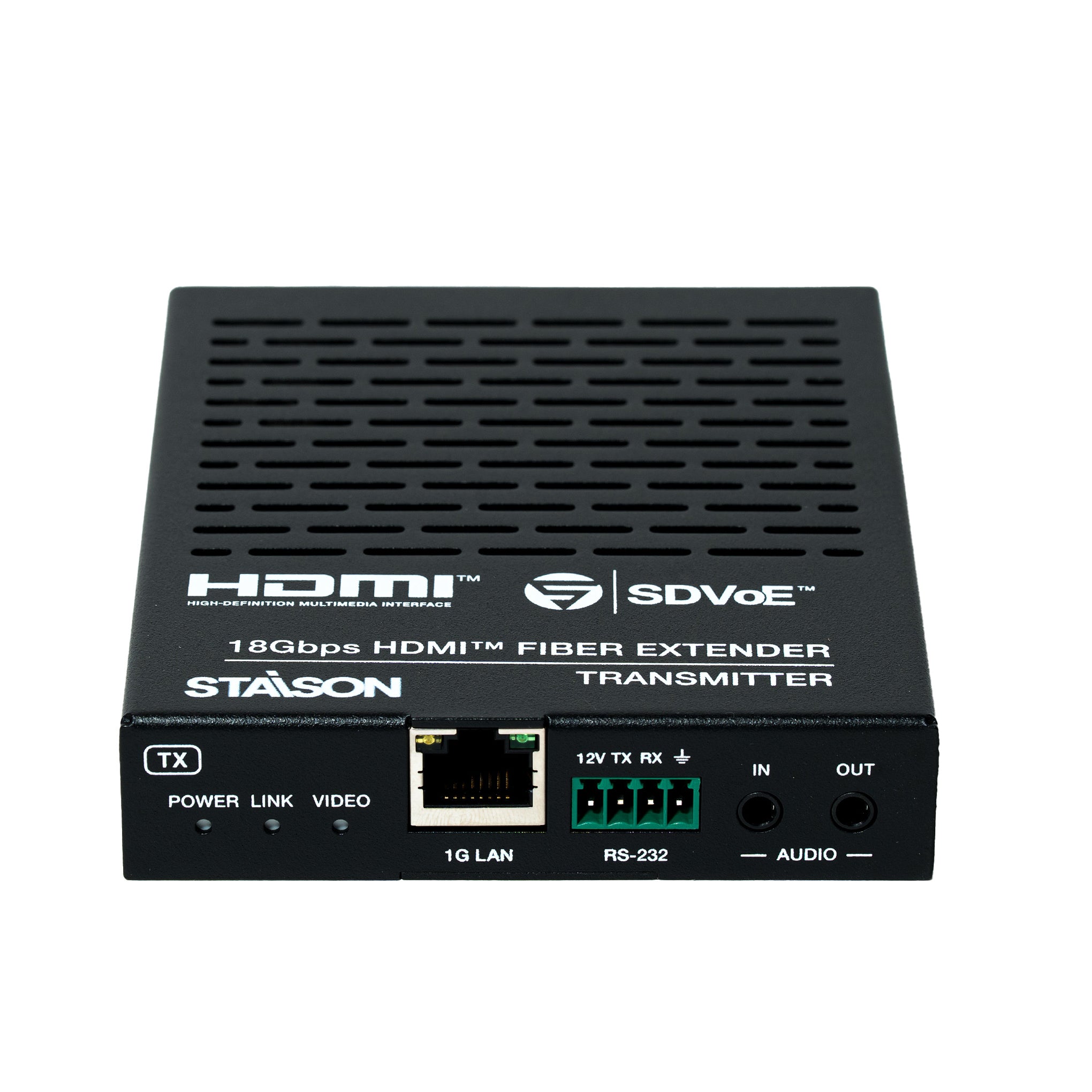
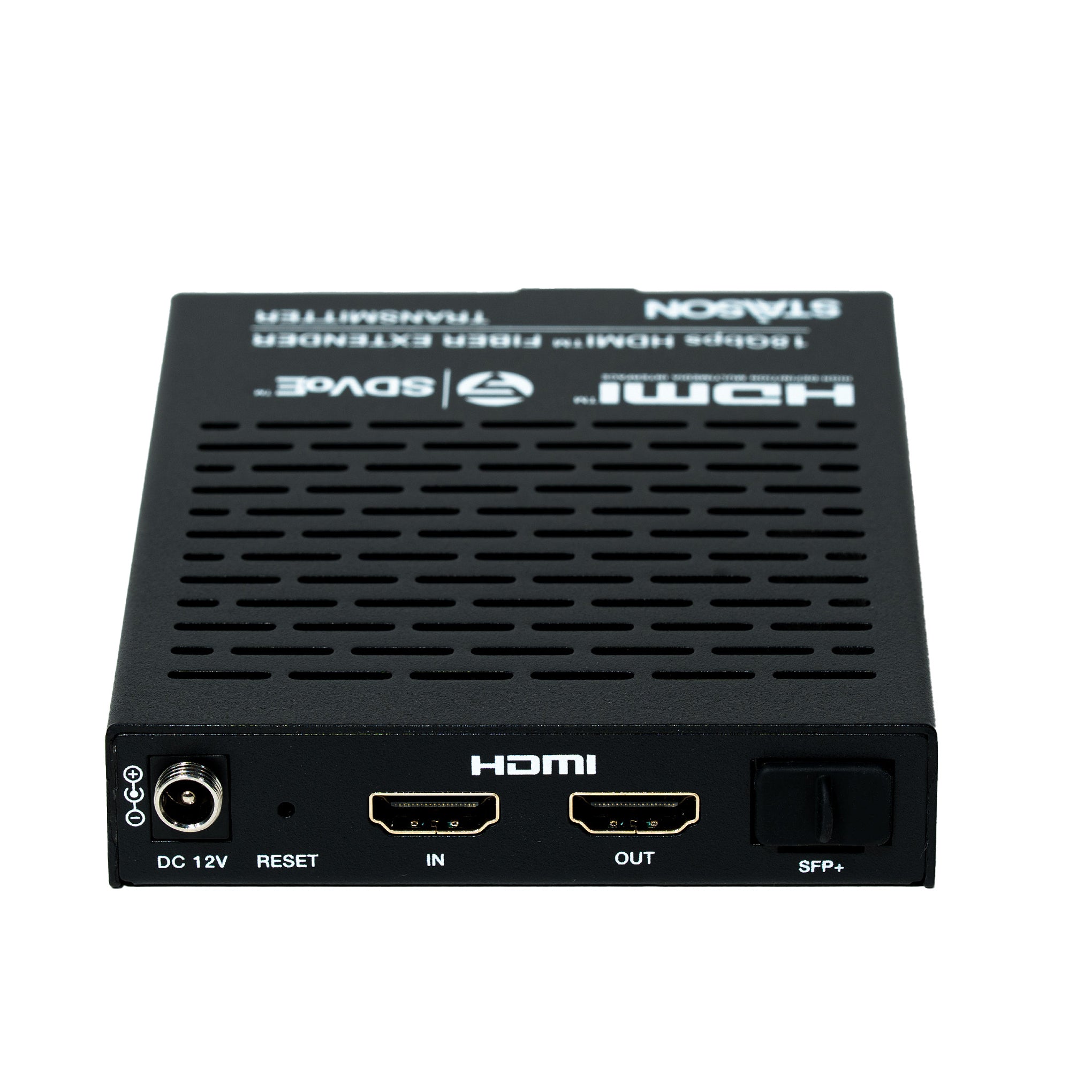
Transmitter (TX) Panel

| No. | Name | Function Description |
|---|---|---|
| 1 | POWER LED (Yellow-green) | On when unit is powered on. Off when powered off. |
| 2 | LINK LED (Yellow-green) | On: 10G network linked. Off: 10G network not linked. |
| 3 | VIDEO LED (Yellow-green) | On: Video signal detected and locked. Flashing: Video detected but cannot lock. |
| 4 | 1G LAN port | 1G network port — connect to 1G Ethernet or PC for management. Link Signal (Green): on = cable connected. Data Signal (Yellow): flashing = data transmitting. |
| 5 / 6 | RS-232 port | Connect to PC or control system via 4-pin 3.5mm Phoenix connector for configuration or RS-232 pass-through. Default baud rate: 57600. Pin layout: 12V · TX · RX · GND. The "12V" pin supplies up to 100mA power to a peripheral device. |
| 8 | AUDIO IN port | Analog audio input — for stereo audio pass-through and HDMI audio embedding. |
| 9 | AUDIO OUT port | Analog audio output — bi-directional stereo analog audio pass-through. |
| 10 | DC 12V port | DC 12V/1A locking power input port. |
| 11 | RESET button | Press and hold for 5 seconds while powered on — LINK and VIDEO LEDs flash at 1Hz simultaneously. Release to restore factory default settings. |
| 12 | IN port | HDMI signal input — connect to HDMI source device (Blu-ray player, set-top box, PC) with HDMI cable. |
| 13 | OUT port (Loop) | HDMI local loop output — connect to a local HDMI display device (TV, monitor). |
| 14 | SFP+ port | 10G fiber optical port — connect with Transmitter optical fiber module (SFP-BL32TG-10DC). Transmits signals to the Receiver via optical fiber cable. |
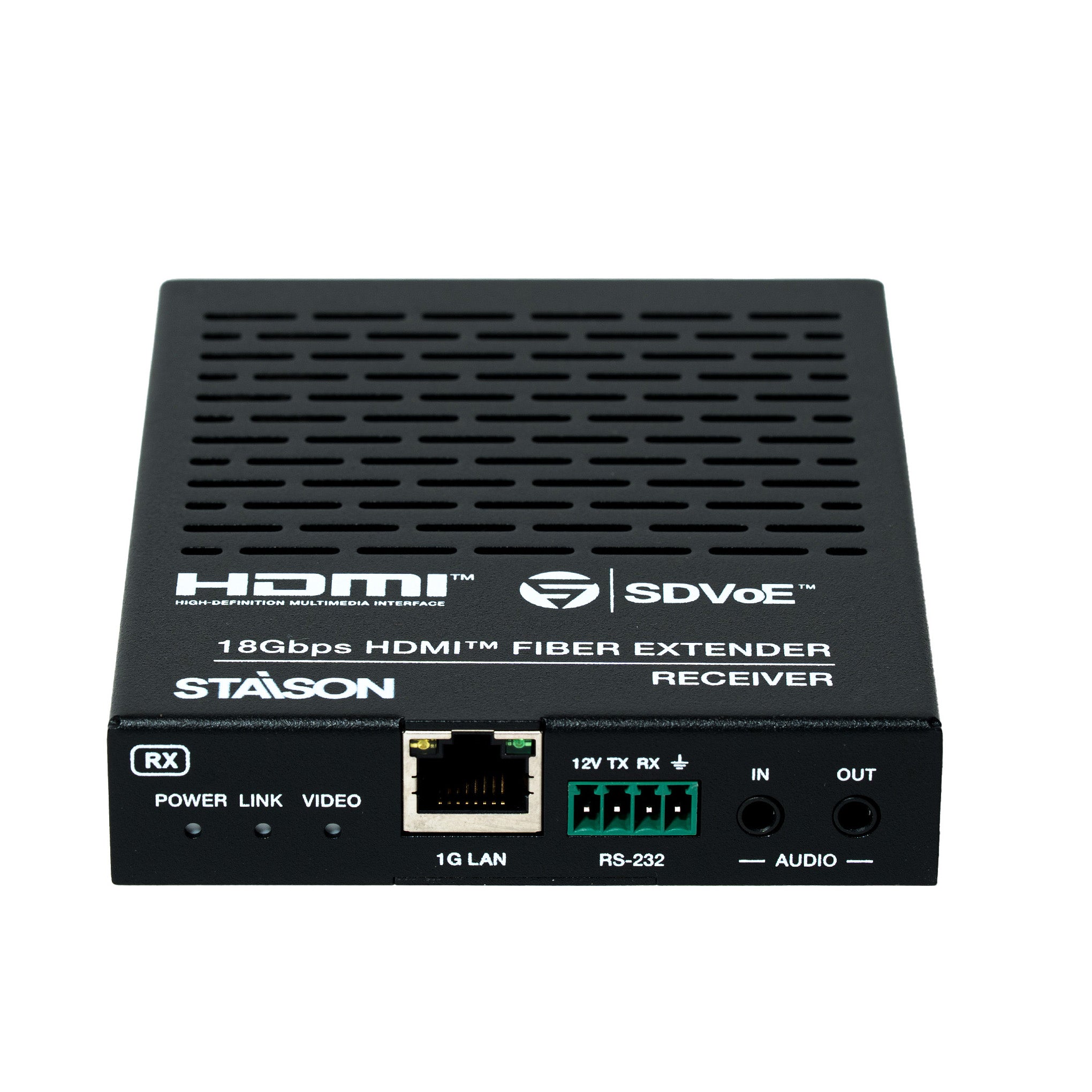
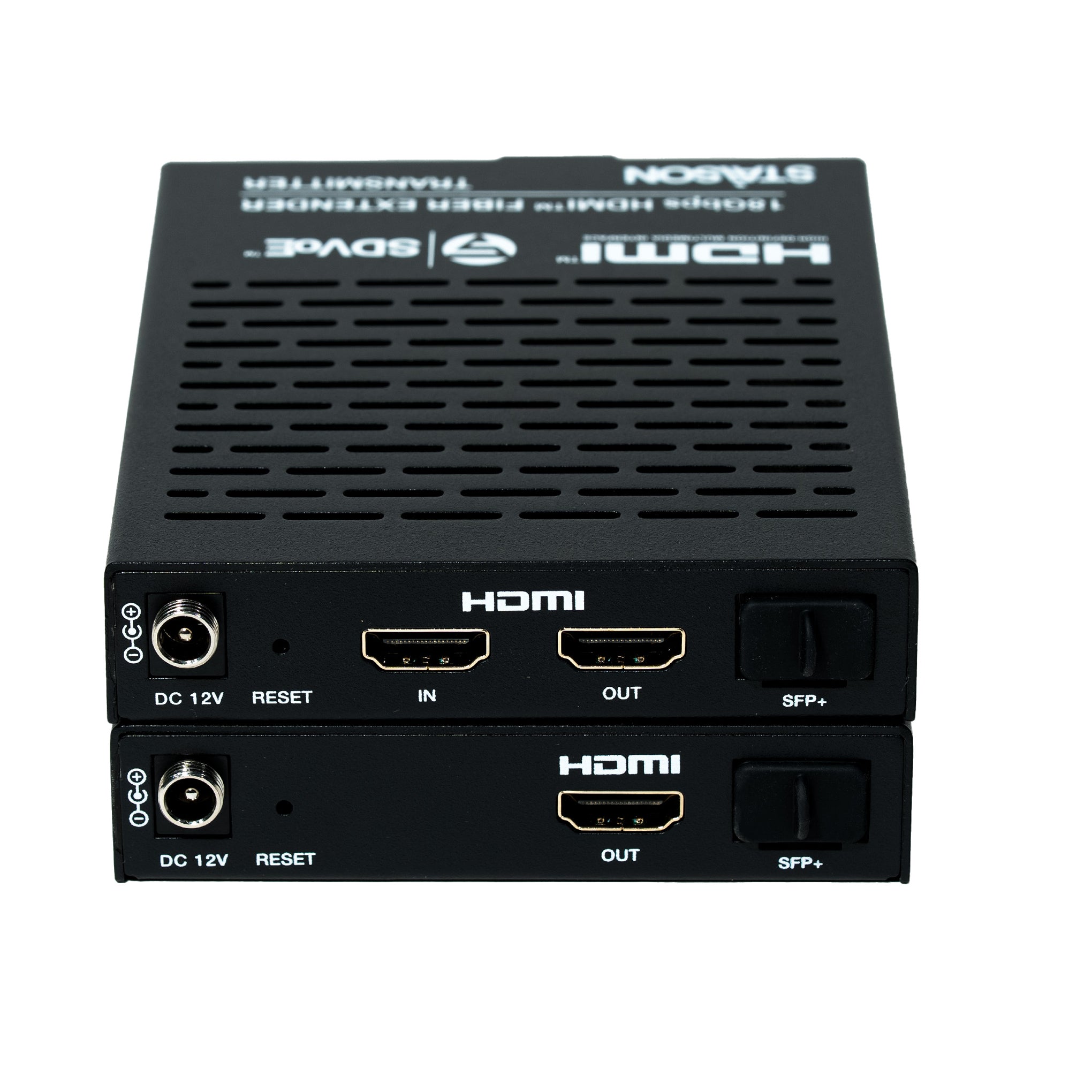
Receiver (RX) Panel

| No. | Name | Function Description |
|---|---|---|
| 1 | POWER LED (Yellow-green) | On when unit is powered on. Off when powered off. |
| 2 | LINK LED (Yellow-green) | On: 10G network linked. Off: 10G network not linked. |
| 3 | VIDEO LED (Yellow-green) | On: Video signal detected and locked. Flashing: Video detected but cannot lock. |
| 4 | 1G LAN port | 1G network port — connect to 1G Ethernet or PC for management. Link Signal (Green): on = cable connected. Data Signal (Yellow): flashing = data transmitting. |
| 5 / 6 | RS-232 port | Connect to PC or control system via 4-pin 3.5mm Phoenix connector. Default baud rate: 57600. Pin layout: 12V · TX · RX · GND. The "12V" pin supplies up to 100mA power to a peripheral device. |
| 8 | AUDIO IN port | Analog audio input — for stereo audio pass-through and HDMI audio embedding. |
| 9 | AUDIO OUT port | Analog audio output — bi-directional stereo analog audio pass-through. |
| 10 | DC 12V port | DC 12V/1A locking power input port. |
| 11 | RESET button | Press and hold for 5 seconds while powered on — LINK and VIDEO LEDs flash at 1Hz simultaneously. Release to restore factory default settings. |
| 12 | OUT port | HDMI signal output — connect to HDMI display device (TV, monitor) with HDMI cable. |
| 13 | SFP+ port | 10G fiber optical port — connect with Receiver optical fiber module (SFP-BL23TG-10DC). Receives signals from the Transmitter via optical fiber cable. |
Optical Fiber Modules

| No. | Model | Description |
|---|---|---|
| 1 | SFP-BL32TG-10DC |
Transmitter (TX) Optical Fiber Module 10G Tx1270/Rx1330nm · 10km · BiDi SFP+ · Class 1 Laser · RoHS & CE compliant |
| 2 | SFP-BL23TG-10DC |
Receiver (RX) Optical Fiber Module 10G Tx1330/Rx1270nm · 10km · BiDi SFP+ · Class 1 Laser · RoHS & CE compliant |
Important — Matched Pair Required: The TX and RX modules use different wavelengths (BiDi / Bi-Directional) and must be used as a matched pair over a single-strand fiber cable. Do not swap or mix modules — SFP-BL32TG-10DC is for the Transmitter only; SFP-BL23TG-10DC is for the Receiver only.
RS-232 Baudrate Settings
This product supports RS-232 baudrate settings via the Upper Computer software ("10G Fiber Extender Control Tool"). Contact your supplier for the installation package. Default RS-232 settings: Baud rate: 57600 · Data bits: 8 · Parity: None · Stop bits: 1.
To configure: connect both TX and RX to a PC via the 1G LAN port. Open the Upper Computer software and click "Search Device" — both Encoder (TX) and Decoder (RX) will appear with their IP and MAC addresses. Select a device, set the desired baud rate/data bits/parity/stop bits, then click "Apply". Repeat for the other device if needed.
Application Example

Note: The terms HDMI, HDMI High-Definition Multimedia Interface, HDMI trade dress and the HDMI Logos are trademarks or registered trademarks of HDMI Licensing Administrator, Inc.